Rebol3 Code Examplex
Bitmap/Midpoint circle algorithm
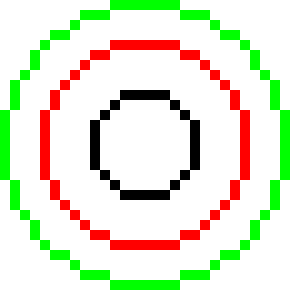
Draw circles with the midpoint circle algorithm.
Rebol [
    title: "Rosetta code: Bitmap/Midpoint circle algorithm"
    file:  %Bitmap-Midpoint_circle_algorithm.r3
    url:   https://rosettacode.org/wiki/Bitmap/Midpoint_circle_algorithm
]

draw-circle: func [
    "Draw a circle on an image using the Midpoint Circle Algorithm."
    bitmap [image!] center [pair!] radius [integer!] color [tuple!]
][
    x:  center/x        ;; unpack center coords from pair for arithmetic
    y:  center/y
    dx: radius dy: 0
    err: 1 - radius     ;; initial error term for midpoint decision

    while [dx >= dy] [  ;; iterate through the first octant only
        ;; Mirror the single computed point into all 8 octants at once,
        ;; exploiting the 8-fold symmetry of the circle.
        bitmap/(as-pair x + dx y + dy): color  ; octant 1
        bitmap/(as-pair x - dx y + dy): color  ; octant 2
        bitmap/(as-pair x + dx y - dy): color  ; octant 8
        bitmap/(as-pair x - dx y - dy): color  ; octant 7
        bitmap/(as-pair x + dy y + dx): color  ; octant 3
        bitmap/(as-pair x - dy y + dx): color  ; octant 4 (swapped dx/dy)
        bitmap/(as-pair x + dy y - dx): color  ; octant 5
        bitmap/(as-pair x - dy y - dx): color  ; octant 6

        dy: dy + 1      ;; advance one step along the minor axis

        ;; Update the error term and conditionally step inward on dx.
        ;; err < 0 means we are still inside the circle boundary
        either err < 0 [
            err: err + (2 * dy) + 1         ;; correct error for dy step
        ][
            dx: dx - 1                      ;; step inward on major axis
            err: err + (2 * (dy - dx)) + 1  ;; correct error for both steps
        ]
    ]
]

img: make image! 29x29          ;; create a blank 29x29 canvas (white by default)
draw-circle img 15x15  5 black  ;; small inner circle
draw-circle img 15x15 10 red    ;; mid-size red ring
draw-circle img 15x15 14 green  ;; large green ring, nearly fills the canvas

;; scale up 10x with nearest-neighbour (Box) to keep pixel edges sharp
img: resize/filter img 290 'Box
save %Bitmap-Midpoint_circle_algorithm.png img
try [view img]