Rebol3 Code Examplex
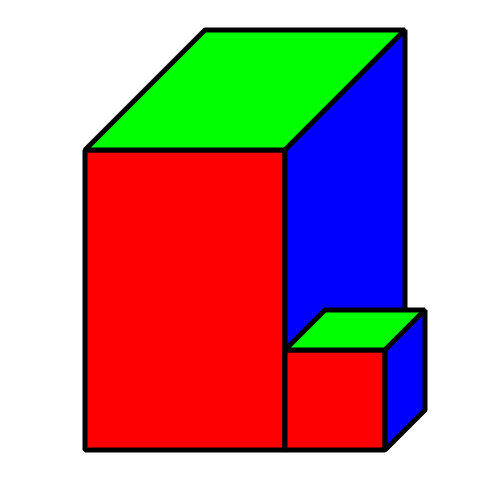
Draw a cuboid
Draw a 3D-looking cuboid using lines or characters.
Rebol [
    title: "Rosetta code: Draw a cuboid"
    file:  %Draw_a_cuboid.r3
    url:   https://rosettacode.org/wiki/Draw_a_cuboid
    needs: Blend2D
]

draw-cuboid: function [
    "Draw a 3-face cuboid using oblique projection."
    image [pair! image!]
    pos [pair!] "Position of bottom-left corner"
    x [number!] "Width"
    y [number!] "Height"
    z [number!] "Depth"
][
    zx: z * 0.4 ;; oblique x-offset
    zy: z * 0.4 ;; oblique y-offset

    ; shift origin up by y so pos refers to bottom-left corner
    origin: as-pair pos/x (pos/y - y)

    draw image compose [
        translate (origin)
        line-width 5 line-join bevel
        ;; front face (red)
        fill-pen red
        polygon 0x0 (as-pair 0 y) (as-pair x y) (as-pair x 0)
        ;; top face (green)
        fill-pen green
        polygon 0x0 (as-pair x 0) (as-pair x + zx 0 - zy) (as-pair zx 0 - zy)
        ;; right face (blue)
        fill-pen blue
        polygon (as-pair x 0) (as-pair x y) (as-pair x + zx y - zy) (as-pair x + zx 0 - zy)
    ]
]

img: make image! 500x500
draw-cuboid img  85x450 200 300 300
draw-cuboid img 285x450 100 100 100
browse save %Draw_a_cuboid.png img